

Ship transactional emails faster
Create, organize and send transactional emails from any system using reusable templates, dynamic variables and a simple API.
Centralize, connect and control your emails
Create a reusable template, connect it to your systems via API and control every send from a single place.
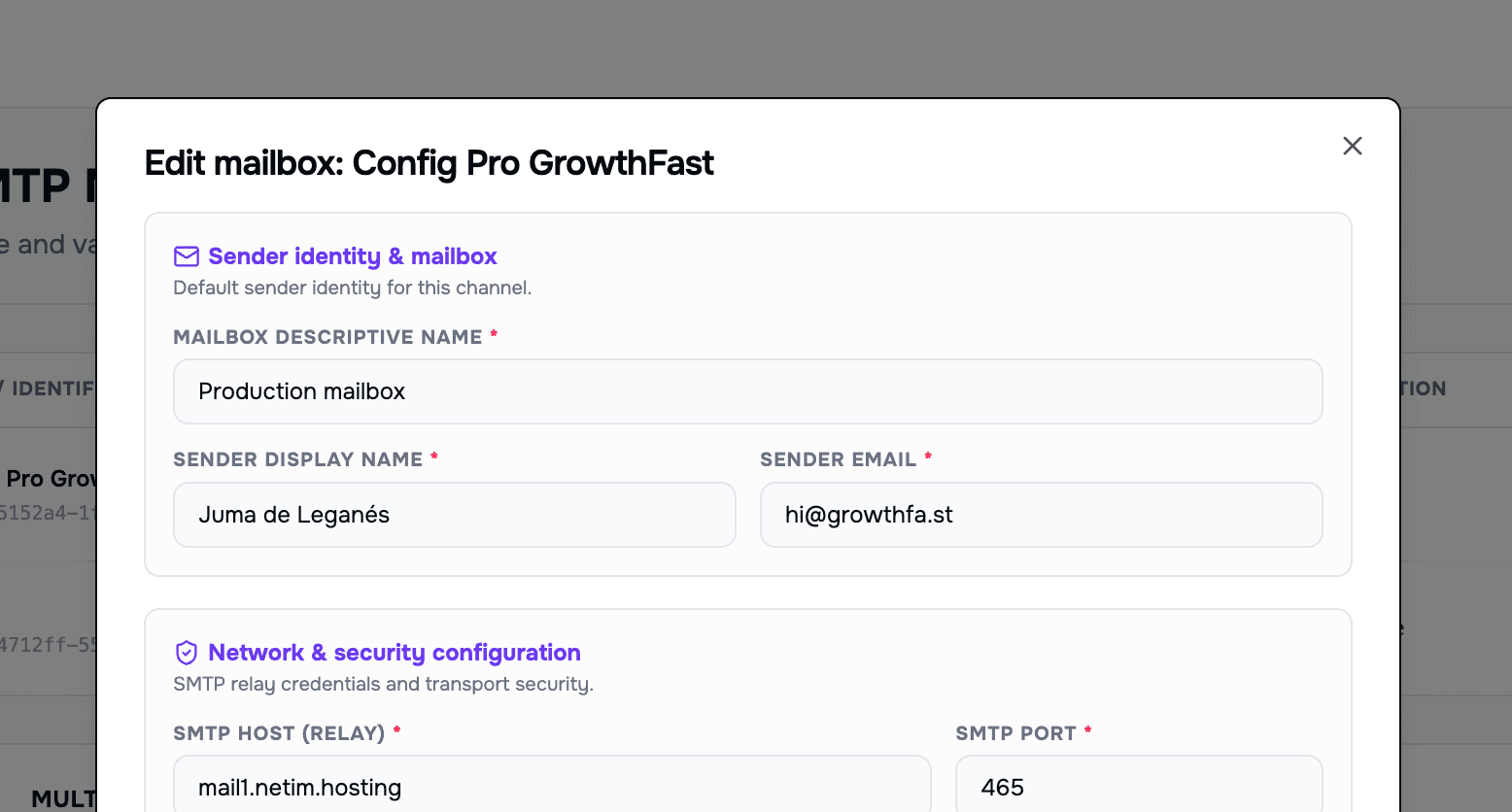
1. Set up your environment in minutes
Connect your SMTP configuration and generate your API key once — no complex setup, no infrastructure to maintain. You are ready to send before your coffee gets cold.
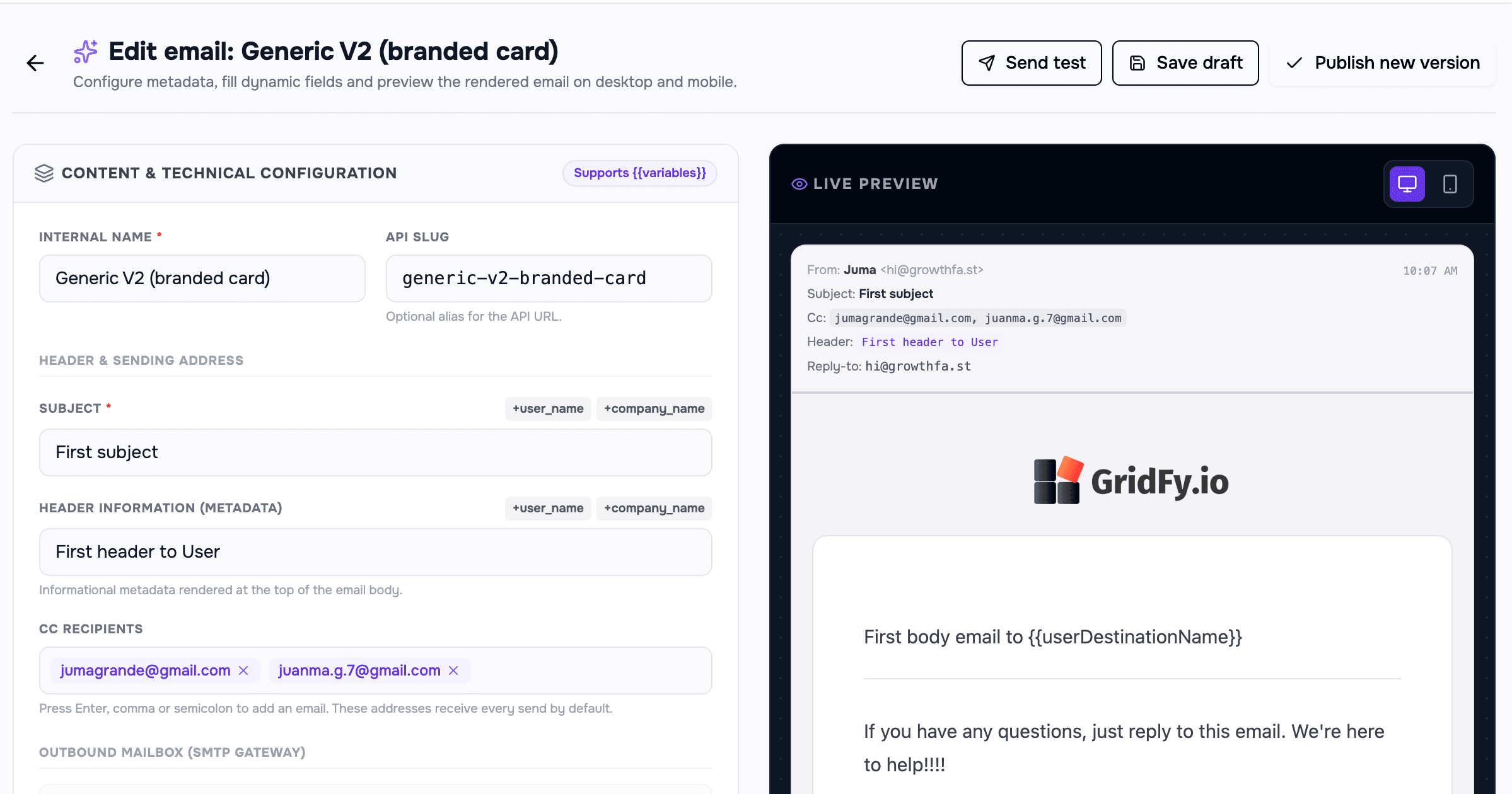
2. Build your email and make it yours
Pick a proven template, then shape the content, subject and dynamic variables exactly how you want them. Personalize every message without touching a single line of design code.
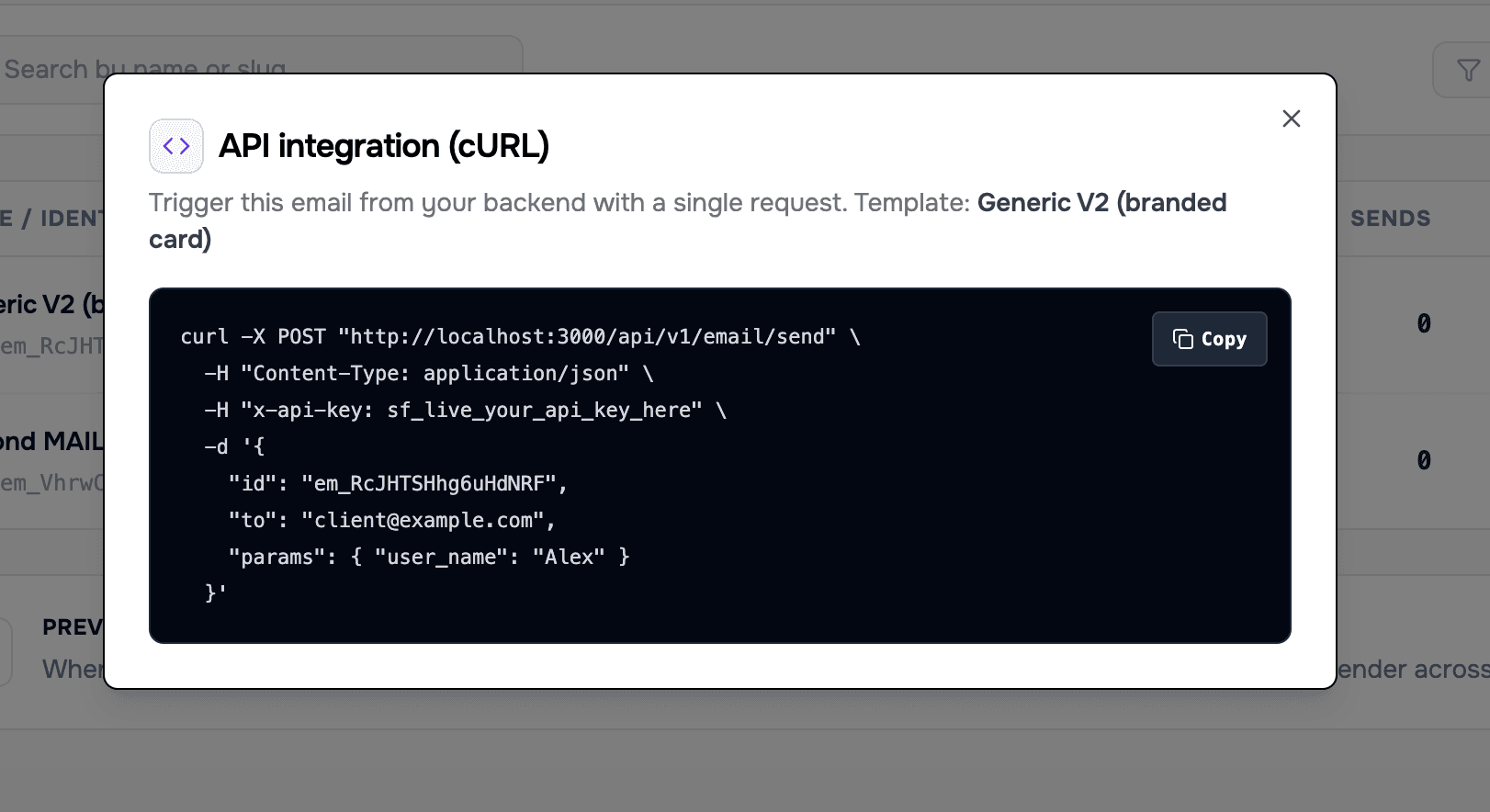
3. Send emails from anywhere you build
Grab your ready-to-use connection snippet and integrate with every platform in your stack. One API, all your products — start delivering transactional emails at scale today.
Transactional emails shouldn't live buried in your code
Changing a piece of copy, tweaking a subject line or updating a critical template usually means tickets, technical reviews, deploys and waiting. Meanwhile, emails like password recovery, onboarding, billing or security alerts stay hard to maintain, measure and control.
Slow changes
A small content tweak can end up depending on a sprint or a deploy.
Little autonomy
Product, marketing or support have to ask engineering for help with simple changes.
Technical risk
Broken variables, duplicated templates or inconsistent content can reach production.
Lack of traceability
It is hard to know which version was sent, when it changed and what happened with each email.
Centralize your templates. Connect all your systems. Control every send.
SentFast lets you manage your emails from a single platform and send them via API from any product, backend, workflow or internal tool. Once the template is created, any system can reuse it with the right variables.
Scattered emails
Every product, tool or automation manages its own emails separately.
Duplicated templates
The same communication ends up recreated over and over across different systems.
Manual or technical changes
Every tweak depends on touching code, reviewing an automation or asking for help.
Inconsistent variables
Each tool handles dynamic data its own way, increasing the risk of errors.
Little traceability
It is hard to know which email was sent, from where, with what data and with what result.
One integration per case
Every flow needs its own connection, hard to maintain and scale.
Centralized emails
All your templates live in a single platform, ready to be reused.
Reusable templates
Create once and reuse the same template from any system.
Controlled editing from the interface
Update content from a visual interface, without touching code.
Defined dynamic variables
Each template declares its variables and receives consistent data on every send.
Logs and metrics per send
Audit every email: what was sent, when, from where and with what result.
A simple API to connect everything
Integrate once and trigger emails from product, backend, workflows or internal tools.
From template to API send in minutes
Create an email
Start from scratch or from a ready-made template for common cases.
Customize the content
Edit subject, copy, CTA, links and footer from a visual interface.
Define dynamic variables
Set up the data each system will send: user, company, link, amount or date.
Preview the result
Check how the email will look with real or test data before publishing it.
Publish the template
Save a stable version ready to be used from your systems.
Send it from any system
Connect your product, backend, automation or internal tool through a simple API.
Emails for any flow in your product or business
Centralize product, operations, business and support communications without building a different integration for each case.
Product
Welcome
Create a polished first experience for new users with editable, reusable templates.
Account confirmation
Send verification messages with dynamic links and safe variables.
Team invitation
Personalize invitations for workspaces, organizations or collaborative products.
Onboarding
Connect activation, first-steps or recommendation emails from your product flows.
Operations
Alerts
Send notices when an important event happens in your system or process.
Reminders
Automate recurring or actionable emails for users, customers or internal teams.
Status changes
Communicate updates to orders, requests, tasks, processes or incidents.
Internal notifications
Inform internal teams about relevant activity without relying on manual emails.
Business
Purchase confirmations
Send clear confirmations with dynamic order, user and amount data.
Invoices
Manage variables like invoice number, date, customer, amount and download link.
Renewals
Create emails for renewal notices, expirations, plan changes or upcoming charges.
Recurring summaries
Send automated reports with personalized information from your systems.
Support
Follow-ups
Automate messages after a conversation, ticket or request.
Incident resolution
Communicate closures, updates or next steps with full traceability.
Surveys
Send satisfaction surveys connected to events or interactions.
Personalized communications
Let your internal tools trigger consistent, controlled emails.
Everything you need to manage connected emails
Reusable templates
Create consistent emails for different flows, products and systems.
Dynamic variables
Define placeholders and personalize each send with the data the API receives.
Editor with preview
Edit content and review the result before publishing a template.
API sending
Trigger emails from your product, backend, automations or internal tools.
API keys
Connect your systems securely using independent keys.
Send logs
Check what was sent, when, from where and with what result.
Analytics
Measure sends, delivery, opens, clicks, bounces and errors.
WebhooksSoon
Receive delivery, open, click or failure events in your own systems.
Roles and permissionsSoon
Give autonomy to create and edit emails without losing control over publishing and configuration.
Built for teams that need to send emails without duplicating work
For engineering
Integrate once and let other teams manage content without touching the sending logic on every change.
For product
Create and adjust onboarding, activation, notification or user communication emails from a centralized platform.
For marketing
Reuse templates, adapt messages and connect communications to real product or business flows.
For support and operations
Check which email was sent, when, from where, with what version and with what result.
A simple API for emails that change without touching your backend
Integrate once, manage everything from SentFast. Your app calls a published email, sends the required variables and SentFast takes care of rendering, validating, sending and logging every event.
- API keys per environment.
- Required variables validated before sending.
- Webhooks for delivery, open, click and error events.
- Logs to debug every send.
Send emails in a few lines of code
Keep your templates under version control. Send variables with real-time interpolation and authenticate with your project API key — no redeploys needed.
// POST /api/v1/email/send
curl -X POST "https://sentfa.st/api/v1/email/send" \
  -H "Content-Type: application/json" \
  -H "x-api-key: sf_live_••••••••" \
-d '{ "id": "em_xxxxxxxxxxxxxxxx", "to": "client@company.xyz", "params": { "user_name": "Alex" } }'Know what was sent, when and with what result
SentFast logs every send so you can understand the performance of your critical emails and resolve incidents quickly.
Autonomy to edit, control to publish
Let more teams collaborate on emails without losing security. Keep live and test apart, manage your keys and control which versions reach production.
Role-based permissionsSoon
Not every user needs to be able to publish or manage keys.
Separate environments
Keep live and test keys apart so a trial send never goes out as production.
Managed API keys
Create, rotate, revoke and scope keys per environment.
Version history
Every change is logged so you can audit and restore.
Start free. Send when you’re ready.
Create and preview your email templates for free. Upgrade to Plus or Pro when your project needs real transactional email sending.
Free
0 €
See SentFast in action: build a template and send yourself a test.
3 email templates
1 project workspace
Test sends only — production sending on paid plans
Plus
7 €Per month
For products shipping transactional email in production.
7-day money-back guarantee
Up to 10,000 emails/month
0.70 € / 1,000 emails
Save 35 € (~42%) paying yearly
Up to 15 email templates
Up to 10 project workspaces
Pro
14 €Per month
Scale your email volume with advanced tooling and priority support.
7-day money-back guarantee
Up to 25,000 emails/month
0.56 € / 1,000 emails
Save 69 € (~41%) paying yearly
Unlimited email templates
Unlimited project workspaces
Frequently asked questions
Everything you need to know before getting started with SentFast.
SentFast is a platform for configuring, managing and sending transactional emails through an API. It lets you create reusable emails, connect them with dynamic variables and send them from different products, systems or automated workflows.
SentFast is used to simplify and speed up automated email sending. Instead of creating and maintaining every email directly in code, you can configure them from a visual platform, preview them, edit their variables and reuse them across multiple integrations.
You can create product emails, such as welcome emails or password recovery emails; operational emails, such as reminders and alerts; business emails, such as invoices or purchase confirmations; and support emails, such as issue resolution messages or follow-ups.
No. SentFast is not designed as an email marketing platform for newsletters or mass campaigns. Its focus is on transactional and automated emails that are part of how a product, business or system works.
SentFast is built for founders, small businesses and teams that want to automate their email communications in a fast and organized way. It is especially useful for projects that need to send emails from an app, backend, CRM, workflow or internal system.
You do not need to touch code to configure and edit emails inside SentFast. However, sending emails from your product or system requires an API integration, so SentFast is especially suited for technical users or teams with technical support.
The basic flow is simple: you configure an email sender, create an API key, define an email from a template, customize its variables and get the code needed to integrate it into your system. From that moment, you can send that email through the API.
Yes. Once an email is configured, you can edit its content, predefined values and preview the result without changing the main integration. This makes it easier and faster to keep your emails up to date.
SentFast is designed to make configuring and sending transactional emails as simple as possible. It is not trying to be a marketing platform, but a clear and practical layer for creating, managing, reusing and integrating automated emails in minutes.
The main benefit is that SentFast lets you centralize all the emails of a project, reuse styles and structures, and connect them through a simple API. This reduces development time, avoids duplicated work and makes emails easier to manage.
Yes. The Free plan includes 1 project workspace and 3 email templates, so you can set everything up and see how SentFast works. Production sending is part of the paid plans, which come with a 7-day money-back guarantee.
SentFast plans will mainly be based on the number of projects, the number of configured emails and the monthly email sending volume. This makes it suitable for both small projects and businesses with higher activity.
SentFast stores variable values, sending history and recipient email addresses in order to guarantee email traceability and make it easier to monitor activity.
API keys are managed at project level. Each project can have its own integration key, which can be deleted whenever needed to keep control over active connections.
SentFast will include an analytics section to track metrics such as emails sent, open rate, recent errors and the number of active configured emails.
Analytics is planned as a future feature. The goal is to help users better understand the performance and status of their transactional emails directly from the SentFast dashboard.
Start managing your transactional emails like a product
Create your first project, set up a template and send your first email via API in minutes.